At the beginning of December I purchased a new phone. The Nokia Lumia 520. I bought if because it was cheep and my phone died, and with over a year left on my contract my options were limited. I did look at other low-end phones, but I couldn’t see using a low-end Android phone after having my Mid to High end phone so long. So that left Windows Phone and I have to say that I mostly like it. For the last 4 months I’ve been working on this review and I look at it today and realise that It’s not really done. I’ve written about half the programs and features that I’ve wanted to, but with the release of Windows Phone 8.1 in the coming weeks I thought I’d clean up what I have and publish it and hopefully find the time to follow-up in the weeks to come.
The Lumia 520 is clearly low-end hardware, with its 480 x 800 screen, 512 MB Ram and only 8GB storage. The processor is nothing special,but even with these limitations it doesn’t feel low-end to hold or 2 use. The area that I bothers me most is the camera, it’s a 5 Mega Pixel, without a flash. Even with its limitations I have managed to capture quite a few pictures that I am proud of. A big plus is the inclusion of a micro SD slot that can handle up to 64GB SD cards to make up for the limited storage and the remove able battery gives me some options to get more life out of the thing.
The front of the phone has 3 Captive touch buttons, Back, Windows, and Search. One of the hardest things to get used to is the layout, the HTC Amaze has 4 captive ouch buttons starting with home, so there was an adjustment. Along the top edge is the Headphone Jack. Right side has the Volume Rockers, Power Button and a dedicated shutter button. The Left has nothing, The bottom edge of the phone has the micro USB connector for charging and connecting to the computer. The SD and Sim Card slot is under the phones back cover next to the removable battery.
When I was researching phones the lower resolution of the 520 worried me, I thought I’d miss the pixels, turns out that I don’t. The picture is vibrant and sharp, with great outdoor viewing. There are times when I do see where more pixels would be nice, but in my day to do use it’s not an issue.
Getting used to Windows Phone 8 has been a bit of a challenge,. Though there are parts of it that I think are better than any other smart phone, all to often as I use them I hit limits that leave me scratching my head and hoping Microsoft fixes in a future update. Notifications is a perfect example. When ever there is a system notification it comes down from the top of screen in a green bar. You can select it or swipe it away. Once it’s gone it’s gone. You can’t leave it for later review. It’s annoying specially after coming from Android Rich notification system, which has gotten even better in the last few releases of android. Still I like the core vision of Windows Phone, one I hope that Microsoft continues to refine in future version of the OS. Now let’s look at some of the features that makes Windows Phone such a compelling OS.
A Sea of Tiles:
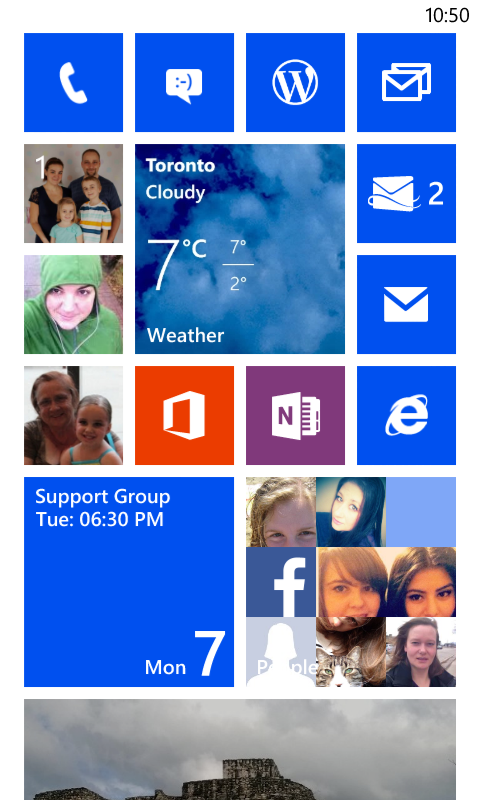
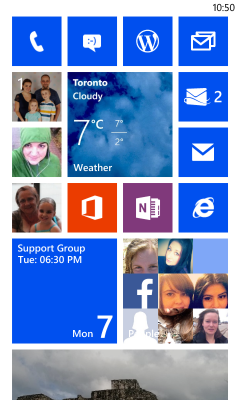
When you start with windows phone you are presented with a sea of tiles, most have the same colour. It’s a clean uniform look. If you have attached it to an Active Microsoft account the People Tile comes to life with pictures of your contacts. The photo tile shows off your own photos from attached accounts,. The Calendar has you next event, it’s almost magical. Out of the gate Windows Feels more like your own device then any others I’ve used. Unfortunately you soon realize that it’s only skin deep. At every turn the clean and useful integration seems to just fall short of what you want.
The Live Tiles can look great, the uniform sizes makes the user interface clean and crisp, but they are so inconsistent with what they show. I know this isn’t all Microsoft fault, they created the platform the app makers have to use it and to few of them are. But their own apps are so hit and miss there is no surprise that the rest of the developers aren’t taking full advantage of it.
Continue reading “Tech Tuesday: Lumia 520”