Today I take a look at 2 service for posting to multiple sites at once, Ping.FM and hellotxt.com. I’ve been members of both for a long time, but I find that I really only use Ping.FM. I’m writing this review to share my experiences with these services and to try and figure out why that is. On the surface there is nothing that puts one over the other. It might have been when they were new, and I signed up ping.fm had better support for the networks I used. If that was the case it’s not anymore. So lets look at the two services as they are today and see what we find.
Ping.FM
www.ping.fm/
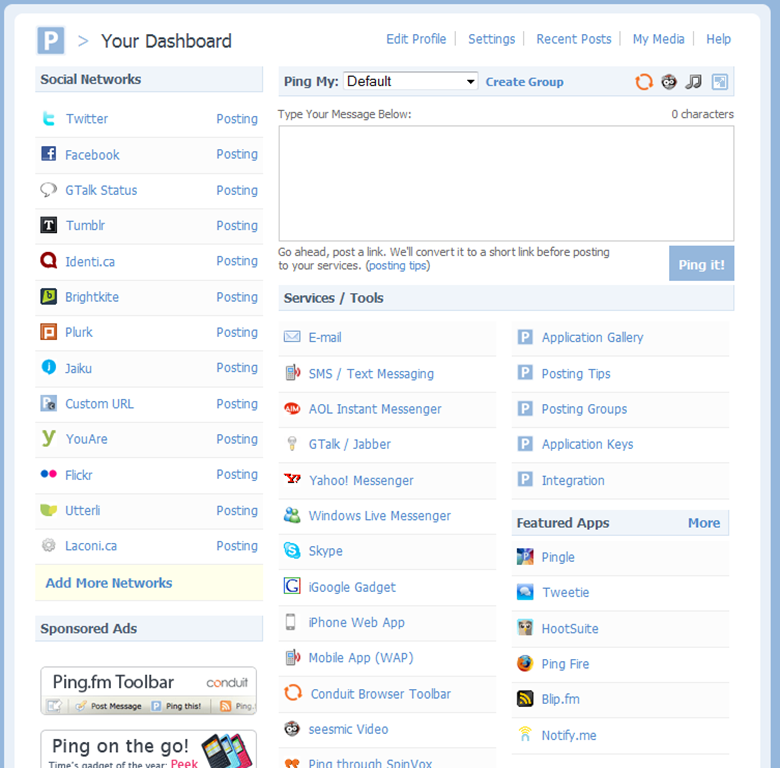
From day one PingFM has had a very simple web interface, with your Social networks on the left and a big box with for typing your updates on the right. Below the update box where the services and tools available from ping.fm. This section has expanded considerably since I started using the service.

The web interface is nice, but my primary way of interacting with Ping.FM has always been through E-mail and IM. When I’m out and about and I want to post an update I usually send a quick email to my ping.fm address and out it goes, if it contains a picture that’s added either embedded in the post, on services that support it, or as a link for people to follow. All media you post is linked to your account and placed in a My Media section so that you can go back and check them out. This is a very nice feature.
Continue reading “Cloud Gazing: Ping.FM and hellotxt”
Over the last week I have done 2 clean installs of windows 7, one for my Work computer and one for my home desktop. The process of setting up a computer can be time consuming, but for these installations I used two different tools to help make it easier. Ninite and AllMyapps, though I like the idea of both I found that each had its issues.
Ninite Categories
Web Browsers
Messaging
Media
Imaging
Documents
Anti-Virus
Runtimes
File Sharing
Other
Utilities
Compression
Developer Tools
Ninite
www.ninite.com
Its all about being simple, the website lets you choose applications by categories. Each category has between 3 and 9 applications to choose from. When you are done your section you download a single executable. You run it and it installs all the selected applications. There are a limited number of apps but they have all but one of the applications I included in my Apps for a new system post back in may. The only one missing is a commercial application so that isn’t bad.
The installs themselves seem to be done in sequential order and seem pretty fast. There also seems to be plans for a business orientated version with additional features and of course a fee. It will be interesting to see what the looks like.
Some of Categories on Allmyapps:
Internet
Office
Graphics
Audio
Video
Games
Education
System
Development
and many more….
Allmyapps
www.allmyapps.com
Is a much more ambitious concept, instead of being just a way to build a custom installer for your favourite programs. Its a site for managing and installing applications. It consists of the website for selecting the application and a desktop client that does the actual install. You can install all the applications in your List in one go, it also provides allows you to do one click installs for all the applications in its repository. Which seems to contain a lot of programs, including games.
Another added benefit is support for multiple operating system. The site also supports Ubuntu Linux, and though I don’t have a computer running Linux to test it on, there seems to be more Linux applications then windows. If face as I looked over the blog and other parts of the site, it would seem that Windows isn’t there primary focus, which could explain why some of the Windows applications I installed weren’t up today. There also seems to have support for commercial applications in the interface, though everything I looked at for windows was free.
Conclusion
Both of these sites make setting up a new computer easier, Lets look at each and what I liked and didn’t like. I want to touch on one of the biggest strengths and weaknesses of these tools. They are both wrappers for installers. For both you choose the applications you want download the wrapper and execute it. It then goes online to get each program you selected and installs them using default selections. These is great in theory but in practice it can fall short. First off if the repository used by the application is out of date you don’t get the newest versions. Second the thought of adding another few hundred meg to my post install downloads seems like it could be excessive if you are setting up more then one computer. These could be solved if there was a cache that could be used instead of always pulling from the Internet.
In the end I’m impressed with both these Sites and will be watching them in the future to see what surprises they have in store for us.
Last week I joined the social game site foursquare, I’ve been looking at it over the past few months wondering when it would come to Canada. So when I heard on Webnation that it had come to our fair city I joined up right away. Foursquare is a social gaming site where you virtually check-in to places you are. This alerts your friends and gains you points you have the more badges you unlock. The person who checks in the most at a place is granted the title of Mayor. It seems like it could be a fun way to interact with friends and random internet people.
Of course I soon released is that my old Windows Smartphone really isn’t really the best interface to play on. I’ve been trying to use the limited web interface to check in. I’ve managed to become the Mayor at my local TTC station and my Bank Branch near my work, but without a better interface or a bunch of my friends joining I don’t see using this on a regular basis.
You can checkout my profile @ http://foursquare.com/user/mrj
When I sat down to write my first entry in my new series Cloud Gazing I had planned on writing about some web based Twitter clients and communication tools. But as I was thinking about it I realized that I have never written a post about Twitter or its competitors. So since I plan on talking about tools that connect to it, I thought I should start with Twitter. This isn’t the first time that I’ve planned on writing about twitter, but it will be the first time it makes into my blog. So today I will look at micro blogging site Twitter.
 When you first go to twitter you are asked ‘What are you doing?’ and gives you 140 characters to answer. Your answer is posted to the stream so that the world can know whatever you answered. Its a simple but effective interface. You then have the people you follow and the people following you. You see the status messages from every one you follow whenever they post it. This can be viewed on the site, or with one of the many clients that are out there. You can also receive updates by SMS on your phone.
One of Twitter strengths is the uses of SMS. It’s also the reason for the character limit. The idea of twitter is you can do it anywhere from your mobile phone. A simple text message and your status is updated. Plus you get regular updates from the people you follow.
The great thing about Twitter is the conversations it sparks. When you post random thoughts or question to a crowd of friends and strangers you can get a lot of interesting responses. The key here is having a community of followers and to follow interesting people. Of course you only get what you put it. The more you use it and engage with the other users the more interesting and informative will it be.
Watching twitter as it’s evolving both with new features and new uses by third parties is fascinating. Twitter has a powerful API that allows almost anyone to use twitter for there own projects. On of the more interesting uses I’ve seen is the Remote control for you desktop computer. One thing is certain there are a ton of uses for twitter that was never envisioned when it first came online.
That said not all the innovation is happening with Twitter, there are a number of services that do a similar things to Twitter. Plurk with its innovative timeline view, where the conversations are built right into the messages. Or StatusNet / identi.ca the distributed open source micro-blogging system which is trying to making micro-blogging more like email where it doesn’t matter what server you use everyone can communicate.
When Google first announce wave back in the spring I was intrigued. It looked like it could change the way that things worked on the web. Of course having to wait after the announcement to get access just built the curiosity. I applied for access to the developers sandbox as soon as I could. I was surprised back in July when I was granted access.
My first thought when I sat in front of the interface was ‘Cool’ and I started to explore. What I found after a short time of exploring was a bit chaotic, there were a ton of waves most of which I couldn’t seem to join. So after being frustrated in the chaos I asked myself what could I build with this. I never came up with an answer and life never seemed to give me the time to really explore it so my account sat mostly unused. I logged in every few weeks to see what’s changed but that’s about it.
When the major expansion of users came round and the hype started to build I thought it might be time to give it another shot. When I first logged in the interface looked the same but there was less Waves. Just one from Dr. Wave explaining how things worked, one for Inviting people to join wave(these are more recommendations then invites though), and one with some sample gadgets that can be used in waves. After exploring the waves I had I was soon wondering what the point was. none of my friend have access yet and I don’t know when the ‘Recommended’ users will be given access.
It was then that I found the ‘with:public’ search that gives you access to all the public waves. With the search chaos returned, but this time I could interact with the waves, and though I did experience some trolls editing my wave in troll like ways I also found a few Waves where the conversation was flowing and I saw the power hidden in Wave. Just one catch you need to have people to talk with. So though I’m sure I will take the occasional swim in the Wave until some of my friends join it wont be a daily destination.
As I’ve been taking about my experiences and not really reviewing the service I thought I would share the a video I found on Lifehacker that explains at least part of what wave does: